Host applications inside Datasette with Datasette Apps
18th June 2026 at 21:51 UTC by Simon Willison
Today we're launching Datasette Apps, a way to create and host custom HTML applications inside your Datasette instance.
Datasette's JSON API is already useful as an application backend. The Datasette Apps plugin lets you edit and host those applications inside Datasette itself.
What makes an app?
This is a very simple example of a Datasette App - all it does is show the counts of rows in two different tables in the datasette.io/content database.
It's embedded here as an <iframe> but you can also visit it in Datasette.
The source code looks like this:
<!DOCTYPE html>
<html lang="en">
<head>
  <style>
  body { font-family: Helvetica }
  </style>
</head>
<body>
  <div id="output"></div>
<script>
async function main() {
  const SQL = `
    select 'blog_posts' as t, count(*) as c from blog_posts
    union
    select 'datasette_repos', count(*) from datasette_repos
  `;
  const results = await datasette.query("content", SQL);
  const html = results.rows.map(row => `
    <strong>${row.t}</strong>: ${row.c}
  `).join("");
  document.getElementById('output').innerHTML = html;
}
main();
</script>
</body>
</html>
The JavaScript runs a read-only SQL query using the await datasette.query() method and then displays the results in a <div> on the page.
Here's a more complicated example against that same database:
That app executes this SQL query to combine results from the news, blog_posts and releases tables, with a :q parameter to represent the user's input:
with combined as (
  select
    'news' as item_type,
    date as item_date,
    null as title,
    body,
    'https://datasette.io/news/' || date as url
  from news
  where cast(:news as text) = '1'
  union all
  select
    'blog' as item_type,
    substr(datetime_utc, 1, 10) as item_date,
    title,
    coalesce(summary, '') as body,
    'https://datasette.io' || path as url
  from blog_posts
  where cast(:blog as text) = '1'
  union all
  select
    'release' as item_type,
    substr(releases.published_at, 1, 10) as item_date,
    repos.name || ' ' || releases.tag_name as title,
    coalesce(releases.body, '') as body,
    releases.html_url as url
  from releases
    join repos on releases.repo = repos.id
  where releases.draft = 0
    and cast(:release as text) = '1'
)
select item_type, item_date, title, body, url
from combined
where coalesce(:q, '') = ''
   or title like '%' || :q || '%'
   or body like '%' || :q || '%'
order by item_date desc
limit 200
As the user types, the query is executed by JavaScript that looks like this:
var results = await datasette.query("content", TIMELINE_SQL, {
    "q": document.getElementById("q").value,
    "news": +document.querySelector('[data-type=news]').checked,
    "blog": +document.querySelector('[data-type=blog]').checked,
    "release": +document.querySelector('[data-type=release]').checked
});
Here's the full source code for this example.
Safe by default
A lot of bad things can happen when you run untrusted HTML and JavaScript inside a larger web application. It's critical that bugs or deliberate exploits in an app can't damage Datasette or corrupt or steal data.
The Datasette Apps framework is designed to strictly control what apps can do and limit the ways in which things can go wrong.
A Datasette App is a single file containing HTML, JavaScript, and CSS. It runs in a secure sandbox with restrictions on both the data it can access and the external sites that it can communicate with.
Running Apps in a sandbox means we can allow more people to create and share them, and use AI tools to build them without fear that AI mistakes could leak or damage our data.
How the sandbox works for HTML apps
Running untrusted HTML and JavaScript within an existing web application is the basis of Cross Site Scripting (XSS), long one of the most common security exploits against web applications.
It's also what every banner ad on the web does, trillions of times a day, thanks to the <iframe sandbox="..."> attribute.
Datasette Apps run in an <iframe sandbox="allow-scripts allow-forms"> sandbox, carefully configured to avoid those apps being able to take malicious actions that affect the parent page.
There's another potential vulnerability that we need to protect against. Data held in Datasette is often private, and while we want custom apps to be able to access that data in a controlled manner, it's crucial that a malicious app cannot exfiltrate (steal) that data by transmitting it back to an attacker's server.
HTML documents offer many ways for an app to leak data. A link, or an image URL, or a fetch() call, or a loaded script or stylesheet can all result in data being transmitted to an external server as part of the loaded URL.
Datasette Apps use another robust, well-proven technology to prevent this: Content Security Policy (CSP). CSP settings within the iframe prevent the sandboxed JavaScript or HTML from loading content from any external domains.
Site administrators can configure an allow-list of domains for an individual app to opt in to communicating with the outside world. The Datasette Timeline example above adds cdnjs.cloudflare.com to that allow-list so it can load the marked and dompurify
JavaScript libraries hosted by cdnjs.
Building an app
Apps are constructed directly through the Datasette interface. Use the menu in the top-right and navigate to "Apps", then click "Create app":
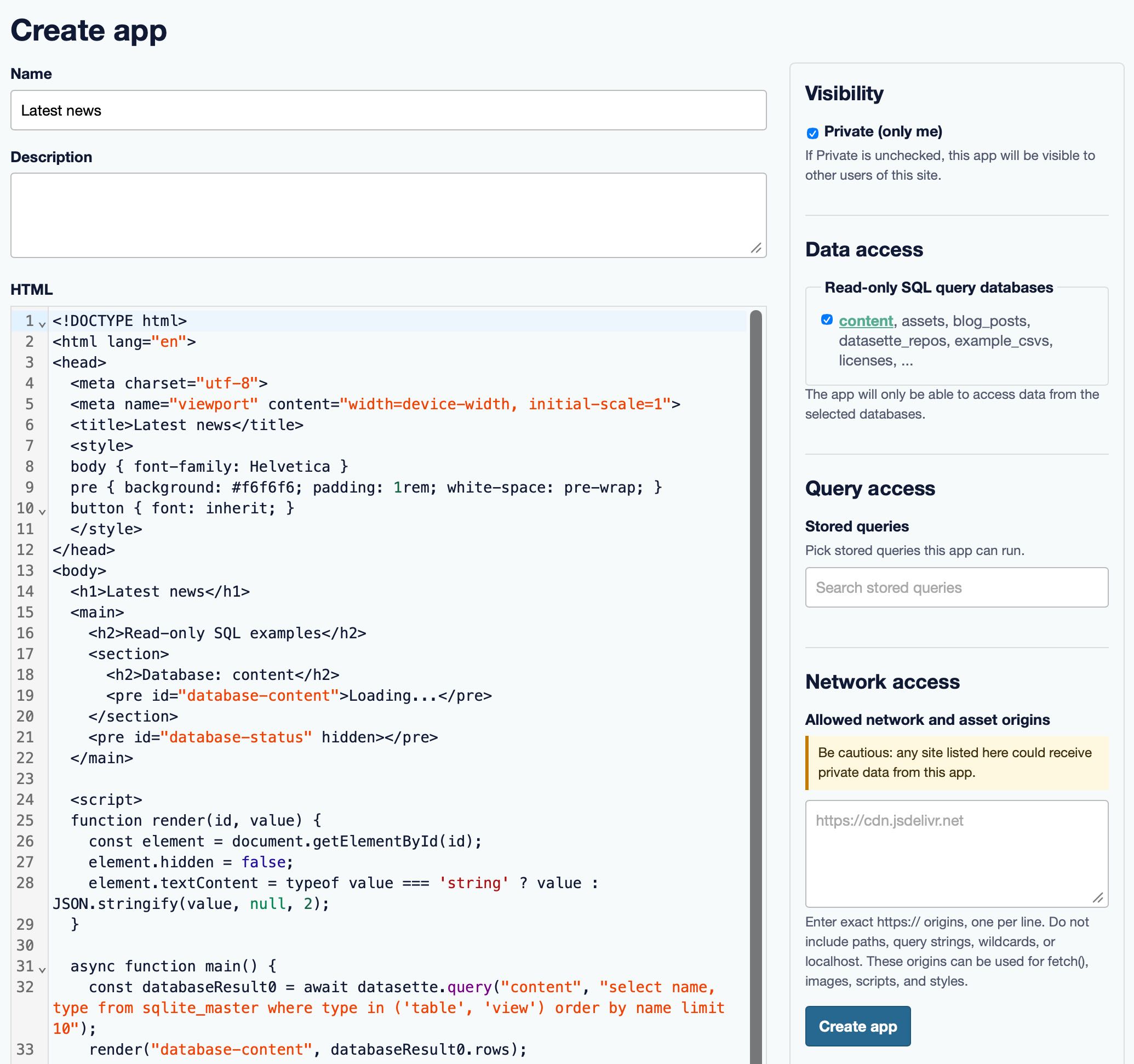
By default apps cannot access data. Select one or more databases in the right-hand column to enable access to them - this will update the starter template to show examples of how to run queries against those databases.
Datasette Apps can also be granted access to specific stored SQL queries, a feature introduced in Datasette 1.0a31. If you store queries that can insert or update data your apps can gain the ability to modify data stored in your database!
... or use an LLM
If you don't want to write all of that HTML and JavaScript yourself, the other option is to have an LLM like Claude or ChatGPT or Gemini write it for you.
Scroll to the bottom of the "Create app" page and you'll find a prompt you can paste directly into one of those platforms that tells them exactly how to build a Datasette App, including details of any databases you have selected for the app to run queries against.
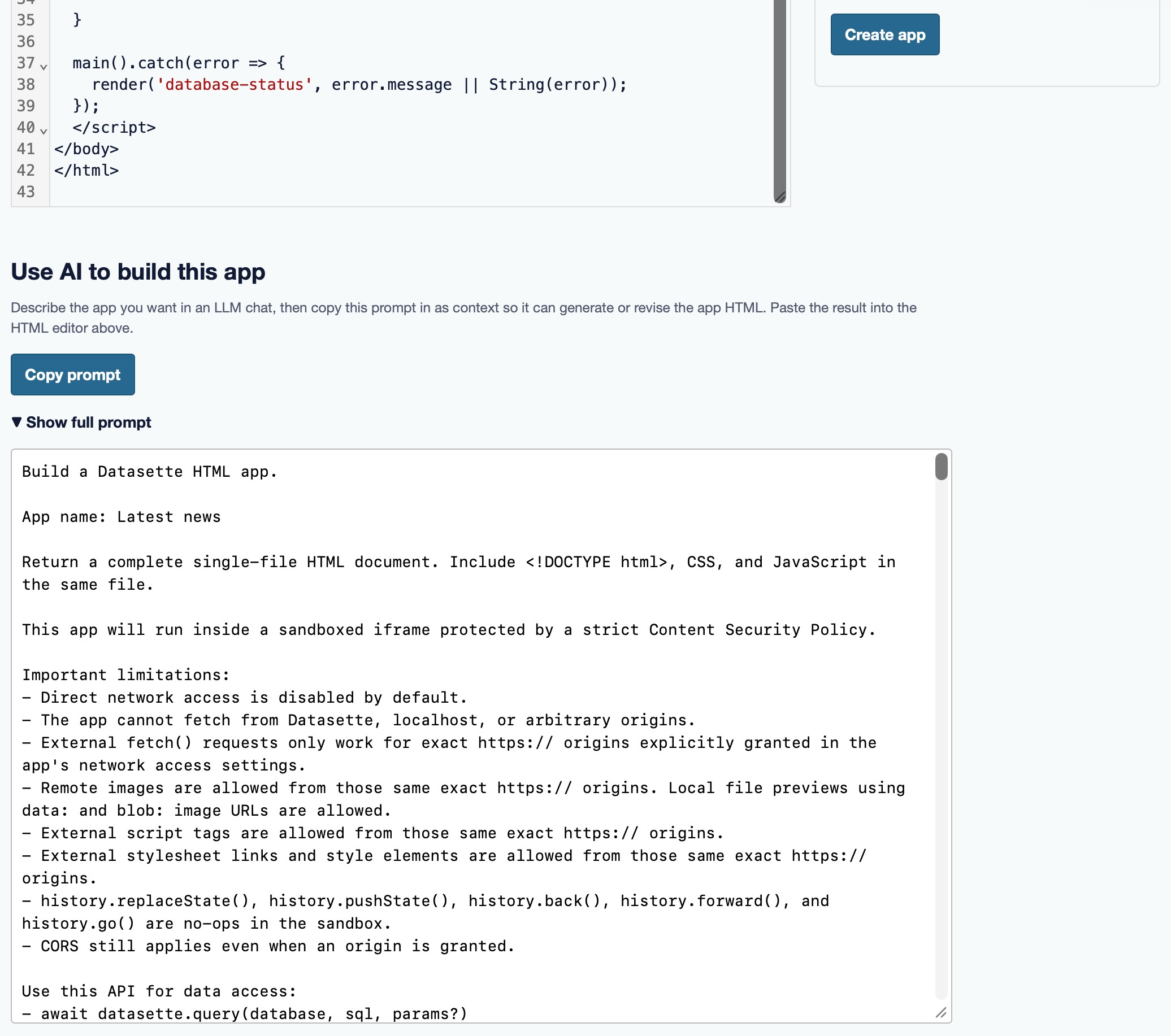
When you edit an app the prompt includes the current app source code, so models can apply changes and you can then copy back the result. The Datasette Timeline example above was built in this way.
Integration with Datasette Agent
Datasette Agent is the AI assistant plugin for Datasette, introduced last month. You can use Datasette Apps without any AI features at all, but if you install datasette-apps and datasette-agent together, your agent will gain the ability to both create new apps and edit existing ones.
Here I tried it out by running this prompt in a fresh Agent session:
Build an app showing the 5 most recent headlines from the blog_posts table
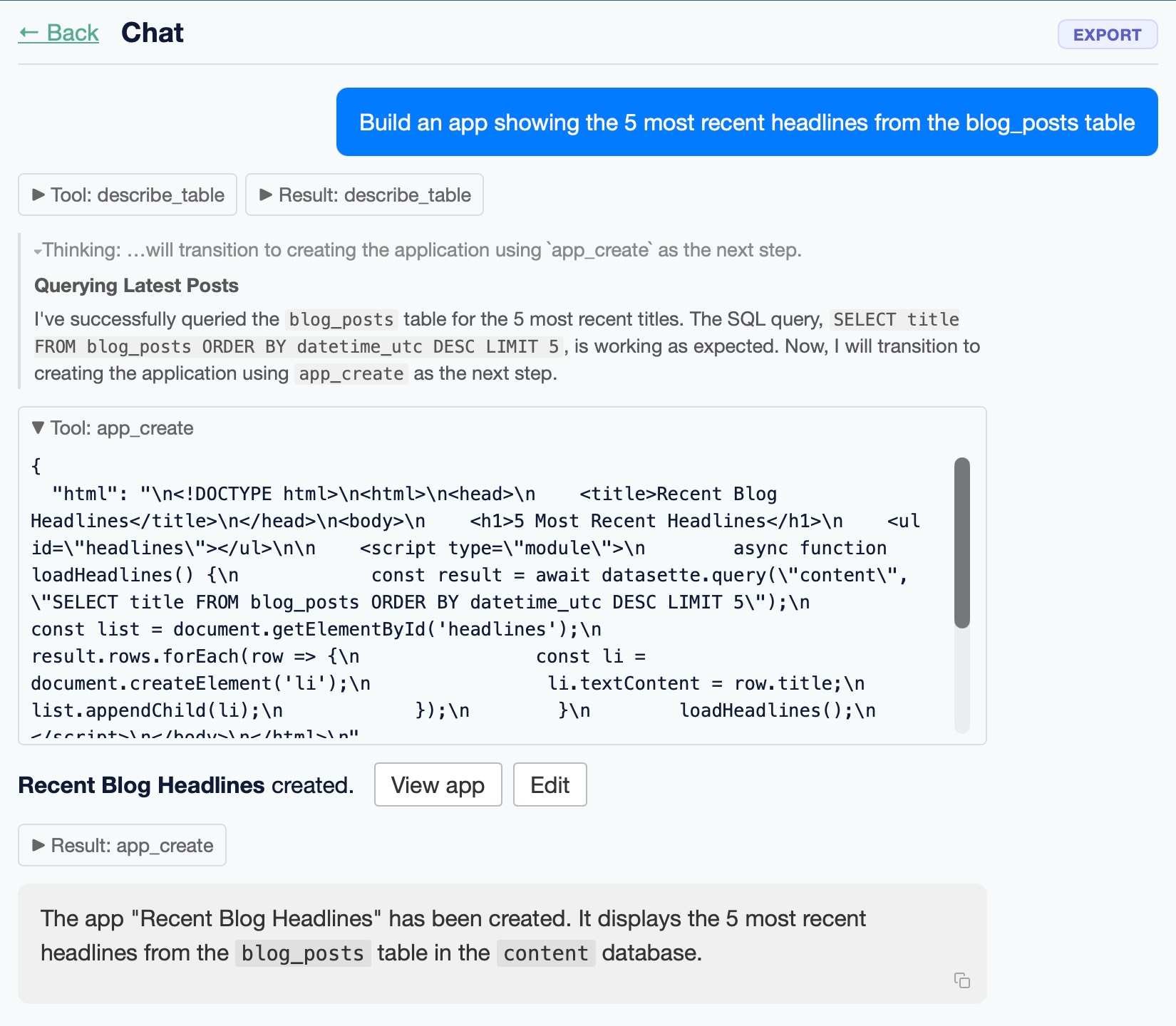
Here's the resulting application.
Try it yourself
We're running a demo instance of Datasette Apps on agent.datasette.io - sign into that site using your GitHub account and select "Apps" from the menu to create an app or view apps that are already stored on the site.
You can also try it out on your own machine. You'll need a recent Datasette alpha to try out the new datasette-apps plugin. Here's the quickest way to get that running locally with uv:
uvx --prerelease=allow --with datasette-apps \
  datasette --internal internal.db --root
Add the paths to any SQLite databases you wish to build apps against to the above line. Here's how to build against a copy of Datasette's own content.db database:
curl -O https://datasette.io/content.db
uvx --prerelease=allow --with datasette-apps datasette --internal internal.db content.db --root
In both cases the apps you create will be saved in the internal.db database.
What next for Datasette Apps?
Being able to build and host applications directly in Datasette opens up a wealth of new possibilities. Apps are currently designed to run full screen, but as shown above there's no reason an app can't be a whole lot smaller. We're looking at apps as a way to provide customizable dashboards in other parts of the Datasette interface.
We're also making it easier to use Datasette to create and edit database tables. Datasette 1.0a34 added tools for inserting and editing data directly through the Datasette table interface, and the next release will include tools for creating and altering table schemas. Combining these features with Datasette Apps will provide a rapid prototyping environment for all sorts of interesting persistent applications.